
Téléchargez deux modèles ISO 27001 éditables — un rapport d'audit interne et un rapport d'évaluation initiale — tous deux conçus pour associer les constats aux clauses 4 à 10 et aux mesures de l'Annex A. Chaque fichier comprend un tableau de constats avec des références aux preuves, des niveaux de risque et des champs de suivi des CAPA déjà formatés, afin que vous puissiez commencer à consigner les observations le jour même sans avoir à construire un classeur de zéro.
En résumé :
- Utilisez le tableau de constats XLSX pour enregistrer les références aux preuves, les niveaux de risque, les causes profondes, les détails des CAPA et les preuves de vérification pour chaque constat, afin de garantir la traçabilité.
- Privilégiez l'enregistrement immédiat des constats pendant le tour d'audit, en joignant les preuves en temps réel pour éviter les lacunes et garantir l'exactitude.
- Associez chaque mesure et clause de l'Annex A à des preuves spécifiques, et indiquez explicitement si les mesures sont incluses ou exclues, en justifiant les exclusions.
- Adaptez le modèle à votre organisation en ajoutant des colonnes par site ou par département pour les entités de grande taille ou multi-sites, sans supprimer les champs essentiels.
- Concentrez-vous sur l'établissement d'une chaîne traçable et claire entre l'observation et la clôture, plutôt que sur la mise en forme parfaite, pour satisfaire aux exigences de la revue de certification.
Table des matières
- Téléchargements de modèles de rapport ISO 27001 : contenu inclus
- Contenu de chaque fichier modèle
- Comment utiliser le modèle d'audit ISO 27001 étape par étape
- Ce qu'il faut documenter pour chaque constat
- Association des constats aux clauses ISO 27001 et aux mesures de l'Annex A
- Exemples de constats de rapport ISO 27001 prêts à copier
- Adaptation du modèle au périmètre de votre organisation
- Échantillonnage intelligent et conseils pour l'auditeur principal
- Comment ISMS Calculator accélère le remplissage du rapport
- Où vérifier les normes de documentation ISO 27001
- Ce qui compte vraiment au moment de rédiger le rapport
- Sources
Téléchargements de modèles de rapport ISO 27001 : contenu inclus
Le modèle de rapport d'audit interne se présente sous la forme d'un fichier DOCX éditable pour les sections narratives (résumé exécutif, périmètre, validation) associé à un classeur XLSX de constats et de liste de vérification Annex A pour la cotation, les références aux preuves et le suivi des CAPA. Un exemple de rapport complété au format PDF est également inclus, principalement pour vous permettre de voir à quoi ressemble un document finalisé avant de commencer à le remplir.
Ouvrez le fichier DOCX pour rédiger le résumé exécutif, le périmètre de l'audit ou les objectifs ; ces sections bénéficient du texte libre et de la mise en forme. Ouvrez le fichier XLSX pour consigner les constats, associer les mesures ou suivre les actions correctives ; un tableur gère bien mieux le tri, le filtrage et les totaux cumulés qu'un tableau Word ne le fera jamais. Le rapport d'évaluation initiale (état de préparation) suit la même structure — DOCX pour la narration, XLSX pour la liste de vérification Annex A — mais avec des champs de constats allégés, car une revue de l'état de préparation n'est pas encore un audit formel.
Les auditeurs principaux gèrent généralement le rapport DOCX et les champs de validation. Les responsables ISMS ou les responsables conformité travaillent plutôt dans la liste de vérification XLSX au quotidien, en mettant à jour le statut de vérification au fur et à mesure de la clôture des actions correctives. Si votre équipe répartit ces rôles, partagez les deux fichiers dès le début afin que personne ne travaille sur une version obsolète.
Contenu de chaque fichier modèle
Chaque feuille de calcul et chaque section des modèles correspond à une tâche précise dans l'audit. Savoir ce qui va où avant de commencer à saisir évite une réécriture ultérieure.
Le bloc page de couverture et métadonnées regroupe en un coup d'œil l'identifiant de l'audit, les dates d'audit, le département audité, le nom de l'auditeur principal et la déclaration de périmètre. Cette section est plus importante qu'il n'y paraît : une déclaration de périmètre vague est l'un des moyens les plus rapides de se voir rejeter un rapport lors d'une revue de certification, car un examinateur ne peut pas déterminer ce qui a réellement été vérifié.
Le tableau de couverture des clauses passe en revue les clauses 4 à 10 (contexte, leadership, planification, support, exploitation, évaluation des performances, amélioration) avec une colonne de statut pour chacune. À côté se trouve la feuille de calcul d'association des mesures de l'Annex A, qui liste l'ensemble des 93 mesures issues de la restructuration de 2022 regroupées en quatre thèmes : organisationnel, humain, physique et technologique.
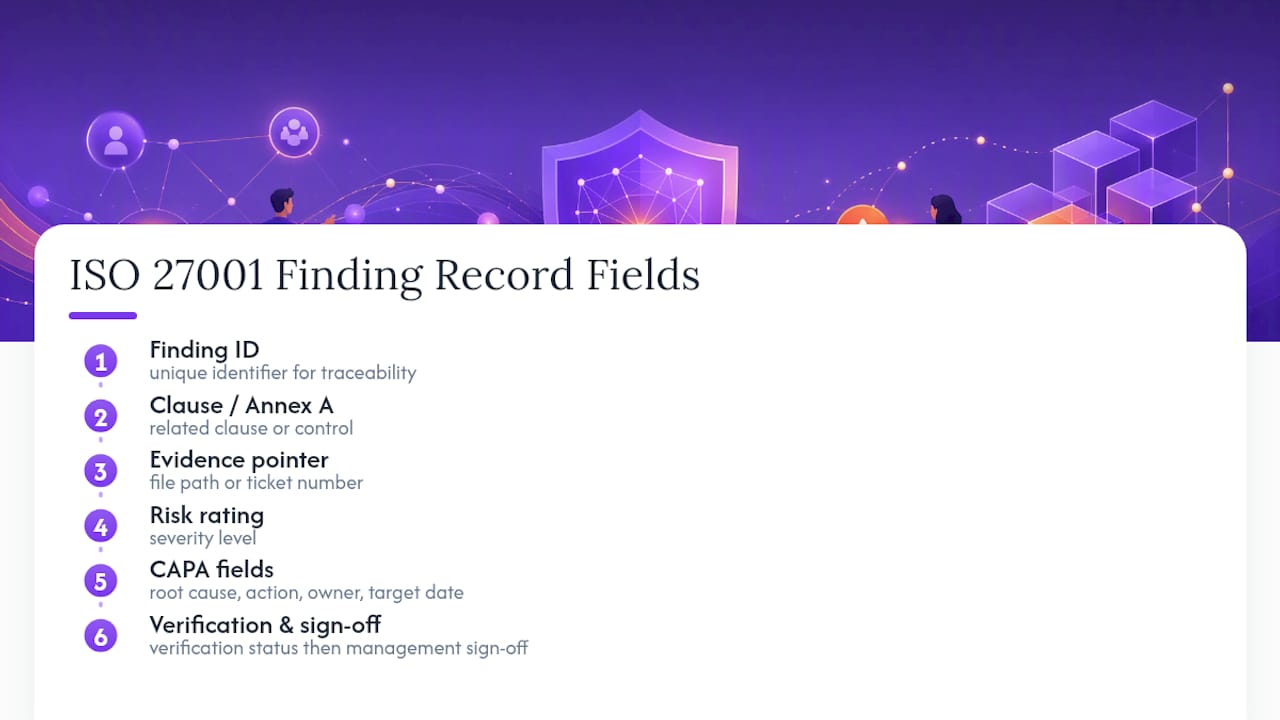
Le tableau de constats constitue le cœur opérationnel du document. Chaque entrée comprend un identifiant unique de constat pour la traçabilité, la clause ou la mesure Annex A concernée, une référence à la preuve (chemin de fichier ou numéro de ticket), un niveau de risque indiquant la gravité, des champs CAPA incluant la cause profonde, l'action corrective, le responsable et la date cible, ainsi qu'une colonne de statut de vérification qui reste vide jusqu'à ce que les preuves de clôture soient examinées. La section synthèse de direction et validation fournit un récapitulatif en langage clair à destination de la direction et des lignes de signature pour l'auditeur principal et le représentant de la direction de l'audité. Omettre cette section fait lire le rapport comme des données brutes plutôt que comme un livrable complet.
Comment utiliser le modèle d'audit ISO 27001 étape par étape
Un modèle de liste de vérification d'audit n'est utile que si vous l'utilisez dans le bon ordre. Exécuter les étapes dans le désordre est la principale raison pour laquelle les rapports d'audit se retrouvent incomplets ou contradictoires.
- Planifier l'audit. Renseignez le périmètre, les objectifs de l'audit et l'échantillon de mesures ou de processus à examiner. Sélectionnez votre échantillon selon une approche basée sur les risques plutôt qu'en examinant tout de façon uniforme. Demandez les preuves à l'avance afin que l'audité ne soit pas pris au dépourvu le jour de la revue, et consignez les notes de la réunion d'ouverture directement dans la section des métadonnées.
- Réaliser l'audit. Enregistrez les observations dans le tableau de constats au fur et à mesure, et non de mémoire après coup. Joignez la référence à la preuve dès que vous la constatez, qu'il s'agisse d'un numéro de ticket, d'un extrait de journal ou d'un nom de capture d'écran. Attribuez un niveau de risque préliminaire sur place ; vous pourrez l'ajuster ultérieurement, mais un constat non coté est facile à oublier.
- Rédiger le rapport. Rédigez le résumé exécutif en dernier, une fois tous les constats consignés. Regroupez les constats connexes par thème (lacunes dans le contrôle d'accès, évaluations des fournisseurs incomplètes, dossiers de formation manquants) plutôt que de les lister dans l'ordre où vous les avez découverts ; une synthèse thématique est bien plus utile pour la direction. Attribuez un responsable CAPA et une date cible à chaque non-conformité avant que le rapport parte en validation.
- Boucler la boucle. Vérifiez que chaque CAPA a bien été réalisée, et pas seulement marquée comme telle. Recueillez les preuves de clôture (une capture d'écran de suivi, une politique mise à jour, un registre de formation complété), mettez à jour la colonne de vérification et soumettez le rapport pour la validation finale.
Conseil pratique : Consignez les constats dans le fichier XLSX dès que vous les observez pendant le tour d'audit, même sous forme brute. Les auditeurs qui attendent la fin de la journée pour rédiger perdent systématiquement des détails sur les preuves, et c'est précisément cette lacune que soulevera un examinateur de certification.
Considérez ceci comme un cycle, et non comme un événement ponctuel. L'audit interne au titre de la clause 9.2 est conçu pour fonctionner en continu, en alimentant la revue de direction, plutôt que comme quelque chose que vous rédigez uniquement lorsqu'un auditeur externe demande à en avoir la preuve.
Ce qu'il faut documenter pour chaque constat
Un constat qui ne peut pas être retracé de l'observation à la clôture constitue un risque lors de la certification, et non un atout. Chaque ligne du tableau de constats doit comporter ces champs renseignés, sans exception :
- Identifiant du constat pour le référencement croisé entre les cycles d'audit
- Référence à la clause ou à la mesure Annex A rattachant le constat à la norme
- Résumé de la preuve, description en une ou deux phrases de ce qui a été observé
- Emplacement de la preuve, chemin de dossier réel, numéro de ticket ou référence de capture d'écran
- Niveau de risque : mineur, majeur ou observation
- Cause profonde : pourquoi l'écart existe, et pas seulement en quoi il consiste
- Action corrective recommandée
- Responsable CAPA et date cible
- Preuve de vérification recueillie à la clôture
- Date de clôture et validation
Voici à quoi ressemble concrètement une ligne complétée :
Constat AR-014. Clause 8.1 et mesure Annex A 5.15 (Contrôle d'accès). Observation : trois anciens employés ont conservé des identifiants VPN actifs 40 jours après leur départ, comme en témoigne le journal de sortie RH daté du 3 mars 2026 et l'export du système de gestion des identités joint à /evidence/AR014_vpn_export.xlsx. Niveau de risque : Majeur. Cause profonde : la liste de vérification de départ ne déclenche pas de ticket automatique de révocation des accès. Action corrective : ajouter une étape de déprovisionnement automatique au processus de départ RH, responsable : Responsable des opérations informatiques, date cible : 15 avril 2026. Vérification : le ré-export des comptes VPN actifs a confirmé l'absence d'anciens employés avec des identifiants actifs au 18 avril 2026. Clôturé et validé le 20 avril 2026.
Formatez les références aux preuves de manière cohérente dans l'ensemble du rapport. Un chemin de dossier (/evidence/AR014_vpn_export.xlsx), un numéro de ticket (JIRA-4521) ou une référence nommée de capture d'écran conviennent tous, mais choisissez une convention par organisation et respectez-la. Un formatage hétérogène dans un rapport de 40 constats est exactement le genre de chose qui amène un examinateur à remettre en question le reste de votre documentation. Pour un aperçu plus complet des preuves que les auditeurs accepteront ou non, le guide pratique des types de preuves ISO 27001 couvre des formats qui ne tiennent pas dans une seule ligne de modèle, et les organisations documentant des mesures techniques spécifiquement peuvent s'appuyer sur les exemples de preuves de chiffrement et de sécurité des données pour cette catégorie de constat.
Association des constats aux clauses ISO 27001 et aux mesures de l'Annex A
La révision de 2022 a réorganisé l'Annex A, passant de 114 mesures à 93 mesures regroupées en quatre thèmes : organisationnel, humain, physique et technologique. Si votre Déclaration d'Applicabilité reflète encore la structure de 2013, votre feuille de calcul d'association doit être reconstruite avant de pouvoir qualifier la piste d'audit comme étant à jour.
Une méthode d'association opérationnelle se déroule en quatre étapes pour chaque mesure :
- Identifiant de la mesure : reprenez le numéro de mesure directement dans la liste actuelle de 93 mesures, et non dans un hybride 2013/2022
- Décision d'applicabilité : indiquez incluse ou exclue, avec une justification en une ligne pour les exclusions (certaines mesures ne s'appliquent genuinement pas — les organisations exclusivement en cloud sans salle serveur physique peuvent raisonnablement exclure certaines mesures de sécurité physique)
- Référence à la preuve : liez le document, le journal ou la capture d'écran spécifique qui étaye la décision
- Entrée dans la Déclaration d'Applicabilité : la décision et la référence à la preuve doivent toutes deux figurer dans la DdA, et non uniquement dans le fichier de travail interne
Un exemple de ligne pourrait être : Mesure 5.23 (Sécurité de l'information pour l'utilisation des services cloud), incluse, référence à la preuve /evidence/cloud_vendor_assessment_2026.pdf, faisant référence au questionnaire de sécurité fournisseur complété pour le principal prestataire cloud. Cette seule ligne, si elle est traçable, dit à un examinateur de certification tout ce dont il a besoin sans question de suivi. Les matrices de conformité construites autour de la structure complète des 93 mesures peuvent associer chaque disposition à une question d'audit spécifique, ce qui vaut la peine d'être examiné si vous souhaitez une référence plus complète au-delà de la liste de vérification intégrée au modèle. Pour une présentation approfondie de ce que chaque famille de mesures couvre réellement, consultez la présentation détaillée des mesures de l'Annex A.
Exemples de constats de rapport ISO 27001 prêts à copier
Voir trois constats finalisés côte à côte, aux trois niveaux de gravité, facilite grandement la formulation des vôtres. Voici comment chacun devrait se lire dans le modèle.
- Non-conformité mineure. Constat : la politique de complexité des mots de passe existe mais n'est pas appliquée sur deux applications internes héritées, comme en témoignent les exports de configuration datés du 10 février 2026. Action corrective : appliquer la politique de complexité standard de l'organisation aux deux applications d'ici le 20 mars 2026, responsable : équipe de support applicatif. Vérification : ré-export de la configuration confirmant l'application de la politique sur les deux systèmes, examinée et clôturée le 25 mars 2026.
- Non-conformité majeure. Constat : la procédure de réponse aux incidents n'a pas été suivie lors d'un incident de hameçonnage en janvier 2026 ; l'équipe sécurité a notifié les utilisateurs concernés neuf jours après la détection au lieu du délai de 24 heures défini dans la procédure. Confinement immédiat : réinitialisation des identifiants de tous les comptes concernés et envoi d'une alerte hameçonnage à l'ensemble de l'organisation. CAPA à long terme : former à nouveau l'équipe des opérations de sécurité sur la procédure de réponse aux incidents et ajouter un déclencheur d'escalade automatique dans le système de ticketing, responsable : responsable des opérations de sécurité, date cible à 60 jours. La vérification nécessite un exercice de simulation ultérieur démontrant que le délai de 24 heures est respecté.
- Observation. Constat : le registre des risques est mis à jour trimestriellement, ce qui satisfait à l'exigence minimale, mais trois responsables de département ont indiqué lors d'entretiens qu'un point mensuel allégé sur les risques émergents leur serait utile. Action recommandée : piloter une revue mensuelle des risques de 15 minutes avec les responsables de département, responsable : Responsable ISMS, sans date cible formelle puisqu'il s'agit d'une opportunité d'amélioration et non d'une non-conformité.
Notez la différence de ton. Le constat mineur est factuel. Le constat majeur distingue le confinement immédiat de la correction à long terme, car un rapport qui mélange les deux brouille le calendrier de clôture. L'observation se lit comme une invitation, non comme une exigence. Pour d'autres exemples travaillés couvrant un éventail plus large de types de non-conformités, le guide des exemples de non-conformités ISO 27001 constitue un complément utile à conserver à côté du modèle.
Adaptation du modèle au périmètre de votre organisation
Certains champs des modèles sont porteurs et ne doivent jamais être supprimés, quelle que soit l'étendue de vos personnalisations. Le lien avec la Déclaration d'Applicabilité, la colonne de référence aux preuves et le champ de vérification CAPA doivent tous survivre à toute modification, car les supprimer rompt la chaîne auditables qu'un organisme de certification s'attend à voir du constat à la clôture.
Pour le reste, adaptez le modèle à votre organisation :
- Les petites équipes s'en sortent mieux avec un tableau de constats compact et des références directes aux preuves plutôt qu'avec un classeur volumineux à plusieurs feuilles ; un modèle lourd que personne ne finit de remplir est pire qu'un modèle allégé entièrement complété
- Les grandes organisations ont généralement besoin de colonnes supplémentaires pour l'index des preuves et d'une feuille d'échantillonnage distincte pour documenter les sites, systèmes ou unités opérationnelles examinés à chaque cycle
- Les organisations multi-sites ou multi-entités doivent ajouter une colonne site ou entité dans le tableau de constats afin que les tendances entre les sites soient visibles en un coup d'œil
Conseil pratique : Conservez un journal des modifications simple sur la page de couverture, même trois lignes : date, modification apportée, auteur de la modification. Lorsqu'un organisme de certification demande pourquoi le format du rapport de l'année dernière diffère de celui de cette année, un journal des modifications visible répond à la question en quelques secondes au lieu de déclencher une discussion plus longue.
Les auditeurs s'attendent également à trouver une poignée de registres opérationnels de soutien au-delà de ce que la norme nomme explicitement : journaux d'incidents, évaluations des fournisseurs, registres de formation. Les préparer en amont de l'audit, plutôt que de les rassembler dans l'urgence à la demande, est l'un des moyens les plus fiables d'éviter une non-conformité majeure sans lien avec votre posture de sécurité réelle.
Échantillonnage intelligent et conseils pour l'auditeur principal
Il n'est pas nécessaire d'auditer chaque mesure à chaque cycle pour obtenir une image fiable de l'état de préparation. Un échantillon basé sur les risques, pondéré en faveur des domaines à risque résiduel élevé et de toute famille de mesures ayant échoué lors d'un audit précédent, vous procure l'essentiel de la valeur d'assurance pour une fraction de l'effort.
Réaliser l'échantillonnage des mesures de l'Annex A en parallèle de la revue des clauses 4 à 10, plutôt qu'en deux passes distinctes, démontre la conformité au niveau du système de manière plus convaincante que de les traiter comme des listes de vérification sans lien. Les praticiens qui échantillonnent par famille de mesures ont également tendance à reporter l'historique des CAPA d'un cycle à l'autre plutôt que de ré-auditer des éléments déjà clôturés proprement, ce qui permet de gagner un temps réel sur les audits récurrents.
Pour les preuves, privilégiez des formats rapides à produire et faciles à vérifier ultérieurement :
- Numéros de tickets de votre service d'assistance ou de votre système de gestion des changements
- Captures d'écran avec une date et un nom de système visibles
- Extraits de journaux couvrant la période spécifique sous examen
- Comptes rendus de réunion pour les mesures liées à la gouvernance, comme la revue de direction ou l'appréciation des risques
Rien de tout cela ne nécessite d'outillage particulier. Cela demande simplement de la rigueur pour capturer les preuves au moment où on les observe, et non en les reconstituant de mémoire une semaine plus tard.
Comment ISMS Calculator accélère le remplissage du rapport
Remplir un modèle d'audit à partir d'une page blanche est la partie la plus lente de tout le processus. La vérification gratuite de l'état de préparation d'ISMS Calculator vous donne un point de départ en deux minutes : répondez à un court questionnaire et obtenez une vue de la maturité sur les quatre thèmes de mesures de l'Annex A que vous pouvez intégrer directement dans les sections périmètre et objectifs de votre rapport d'évaluation initiale.
Fonctionnalités utiles pour la production de rapports :
- Une vérification gratuite de l'état de préparation en 2 minutes pour établir une base de référence avant votre premier audit formel
- Des évaluations de maturité couvrant les quatre thèmes de mesures de l'Annex A, utiles pour renseigner le tableau de couverture des clauses
- Des rapports PDF exportables que vous pouvez joindre comme preuves de soutien dans le fichier d'évaluation initiale
- Des plannings Gantt personnalisables pour suivre les phases de mise en œuvre parallèlement à vos dates cibles CAPA
- Des comparaisons avec une référence modèle pour valider si vos constats sont typiques de votre secteur ou constituent un véritable cas particulier
| Situation du lecteur | Meilleur point de départ |
|---|---|
| N'a jamais réalisé de vérification de l'état de préparation | Vérification gratuite de l'état de préparation en 2 minutes |
| A besoin d'une vue plus complète de la maturité sur les quatre thèmes de mesures ISO/IEC 27001:2022 | Évaluation de l'état de préparation ISO 27001 |
| Est déjà en cours d'audit et a juste besoin de fichiers de rapport éditables | Utiliser directement les modèles DOCX et XLSX |
Utilisez la vérification de l'état de préparation lorsque vous souhaitez un référentiel rapide avant de vous engager dans un cycle d'audit interne complet. Restez sur les modèles éditables lorsque vous êtes déjà en cours d'audit et que vous avez besoin d'un suivi granulaire des constats qu'un outil de synthèse n'est pas conçu pour remplacer.
Où vérifier les normes de documentation ISO 27001
Quelques sources méritent d'être ajoutées à vos favoris aux côtés des modèles eux-mêmes. La note de Protiviti sur la transition vers la version 2022 explique pourquoi l'audit interne doit fonctionner comme un cycle continu plutôt que comme un événement ponctuel déclenché par la demande d'un auditeur externe. La liste de vérification complète des 93 mesures est utile si vous souhaitez une référence question par question au-delà de ce que la feuille de calcul d'association du modèle couvre seule.
À retenir : il n'existe pas de liste de vérification unique publiée par l'ISO elle-même. Chaque liste de vérification et chaque matrice que vous trouverez, y compris celles référencées ici, est un outil élaboré par des praticiens conçu pour traduire la norme en questions prêtes pour l'audit, et non un document officiel de l'ISO. Traitez-les comme des aides de travail, non comme parole d'évangile, et recoupez tout élément inhabituel avec les propres orientations de votre organisme de certification.
Ce qui compte vraiment au moment de rédiger le rapport
La plupart des conseils sur la rédaction de rapports ISO 27001 consacrent trop de temps à la mise en forme et pas assez à ce qui détermine réellement si un rapport survit à une revue de certification : la capacité de tracer chaque constat, sans interruption, de l'observation à la preuve, de l'action corrective à la clôture vérifiée. Un rapport magnifiquement mis en forme avec une lacune quelque part dans cette chaîne sera signalé. Un tableur simple, voire peu esthétique, où chaque ligne se trace proprement, ne le sera pas.
Le conseil classique consistant à « tout documenter de manière exhaustive » rate l'essentiel. L'exhaustivité sans traçabilité ne produit qu'un document plus long à disséquer. Donnez la priorité à la référence aux preuves et au champ de vérification plutôt qu'au soin apporté au résumé exécutif. Les lecteurs de cet article devraient construire le tableau de constats en premier, faire fonctionner la chaîne sur deux ou trois constats réels, et ne s'inquiéter de la lecture de la synthèse de direction qu'ensuite. Les outils qui pré-remplissent des données de maturité, comme une vérification de l'état de préparation, sont les plus utiles lorsqu'ils alimentent des chiffres réels dans cette chaîne plutôt que de remplacer la rigueur du suivi des preuves par vous-même.
— Martin
Sources
- Principaux changements et approches de transition ISO 27001:2022 (Protiviti)
- Auditchecklists
- La liste de vérification moderne de conformité ISO 27001 (2026) — ComplyJet
- Modèle d'audit interne ISO 27001 | Cadenio