
La disponibilité désigne la qualité ou l'état d'être prêt, accessible et utilisable au moment voulu. Merriam-Webster la définit simplement comme « la qualité ou l'état d'être disponible », et cette définition s'applique aussi bien à un créneau de rendez-vous libre qu'à une base de données de production. En sécurité de l'information, la disponibilité constitue le troisième pilier de la triade CIA, aux côtés de la confidentialité et de l'intégrité. ISO/IEC 27000 et le NIST Cybersecurity Framework en font tous deux une propriété de sécurité formelle : les systèmes, services et données doivent rester fonctionnels pour les utilisateurs autorisés lorsqu'ils en ont besoin. Lorsque la disponibilité est compromise, les organisations perdent des revenus, la confiance de leurs clients et, parfois, leur conformité réglementaire.
Points clés
La disponibilité signifie qu'un système, un service ou une ressource est prêt et utilisable lorsque nécessaire, et les organisations doivent la mesurer, l'architecturer et la protéger à la fois comme propriété opérationnelle et comme propriété de sécurité.
| Point | Détails |
|---|---|
| Définition centrale | La disponibilité est la qualité ou l'état d'être prêt et accessible, et constitue le troisième pilier de la triade CIA en sécurité de l'information. |
| Formule de calcul | Disponibilité % = (Temps total − Temps d'arrêt) / Temps total × 100 ; 99 % autorise environ 8,76 heures d'indisponibilité par an. |
| Définir les objectifs à partir de l'impact | Déduire le RTO et le RPO du coût de l'indisponibilité par heure, et non en cherchant à atteindre des « neuf » affichés dans les communications. |
| Contrôles clés | Redondance, basculement, sauvegardes testées, supervision et runbooks constituent les principaux leviers techniques. |
| Alignement sur les normes | ISO/IEC 27000 et le NIST Cybersecurity Framework traitent tous deux la disponibilité comme une exigence de sécurité formelle, au même titre que la confidentialité et l'intégrité. |
Table des matières
- Que signifie la disponibilité dans le langage courant ?
- Comment la disponibilité est définie en informatique et en sécurité de l'information
- Comment mesure-t-on la disponibilité ?
- Comment les organisations maintiennent-elles la disponibilité de leurs systèmes ?
- En quoi la disponibilité diffère-t-elle du plan de reprise d'activité ?
- Quelles sont les menaces les plus fréquentes contre la disponibilité ?
- Comment définir des objectifs de disponibilité à partir de l'impact métier ?
- Une liste de contrôle pratique pour votre équipe
- Pourquoi la planification de la disponibilité concerne désormais tout le monde, pas seulement l'équipe Ops
- Sources
Que signifie la disponibilité dans le langage courant ?
Dans son sens le plus fondamental, la disponibilité est la qualité ou l'état d'être facilement obtenu, accessible ou prêt à l'emploi immédiat. Le Cambridge Dictionary la définit comme « le fait que quelque chose peut être acheté, utilisé ou atteint, ou la quantité qui en existe ». Ces deux définitions pointent vers la même idée centrale : quelque chose est disponible lorsque vous pouvez y accéder, l'utiliser ou l'acquérir dès maintenant.
Des exemples du quotidien permettent de rendre le concept concret très rapidement :
- « Je suis disponible jeudi après-midi » signifie que vous avez des créneaux libres que d'autres peuvent réserver.
- « Dans la limite des stocks disponibles » sur une page produit signifie que les articles peuvent être épuisés avant l'expédition de votre commande.
- « Le service est disponible 24h/24, 7j/7 » signifie qu'il fonctionne en continu, sans interruption planifiée.
- « Disponibilité limitée » sur un site de billetterie de concert signale une rareté, et non une défaillance technique.
- « Le médicament est disponible sans ordonnance » signifie qu'aucune prescription n'est requise pour l'obtenir.
On remarque que la disponibilité dans le langage courant se confond souvent avec l'accessibilité. Dictionary.com note que les deux termes sont utilisés de manière interchangeable dans des phrases telles que « L'accessibilité d'Internet a accru la disponibilité de l'information ». Ils sont liés mais pas identiques : l'accessibilité désigne souvent la possibilité d'atteindre quelque chose, tandis que la disponibilité y ajoute la dimension de préparation et de quantité.
Conseil pratique : Lors de la planification de réunions, remplacez « faites-moi part de vos disponibilités » par un créneau précis : « Je suis libre mardi de 10h à 11h ou mercredi de 14h à 15h ». Une demande de disponibilité vague génère trois échanges ; un créneau précis se conclut généralement en un seul.
Comment la disponibilité est définie en informatique et en sécurité de l'information
En informatique et en sécurité, la disponibilité possède une signification précise, étayée par des normes. La triade CIA la définit comme la garantie que les utilisateurs autorisés peuvent accéder aux systèmes et aux données lorsqu'ils en ont besoin, avec des performances acceptables. Elle se situe aux côtés de la confidentialité (protéger la vie privée des données) et de l'intégrité (garantir l'exactitude des données) parmi les trois propriétés fondamentales que tout programme de sécurité de l'information doit protéger.
ISO/IEC 27000 et le NIST Cybersecurity Framework invoquent tous deux la disponibilité comme objectif central de sécurité. Le NIST National Cybersecurity Center of Excellence la formule ainsi : les systèmes, informations, applications et services doivent rester accessibles et fonctionnels pour les utilisateurs autorisés lorsqu'ils en ont besoin. Les menaces ciblant spécifiquement la disponibilité comprennent les attaques par déni de service, les rançongiciels, l'épuisement des capacités et les pannes de région cloud.
Cas d'usage pratiques en informatique où la disponibilité est la préoccupation principale :
- Une application web devant servir des clients en permanence
- Une base de données devant répondre aux requêtes dans des seuils de latence définis
- Une API dont dépendent des services en aval pour des données en temps réel
- Des systèmes de sauvegarde devant restaurer les données dans une fenêtre de récupération définie
- Des services d'authentification dont l'indisponibilité prive tous les utilisateurs d'accès à l'ensemble des systèmes
Ce dernier point est souvent sous-estimé par la plupart des équipes. Les contrôles de sécurité peuvent entrer en conflit avec la disponibilité : des politiques d'accès trop restrictives ou une authentification multifacteur mal implémentée peuvent provoquer des verrouillages qui refusent l'accès à des utilisateurs légitimes. La disponibilité n'est pas seulement une préoccupation opérationnelle ; c'est une préoccupation de sécurité dans les deux sens.
Comment mesure-t-on la disponibilité ?
La disponibilité est exprimée en pourcentage du temps total pendant lequel un système est opérationnel et utilisable. La formule standard est :
Disponibilité (%) = (Temps total − Temps d'arrêt) / Temps total × 100
Le raccourci des « neuf »
Le raccourci du secteur « neuf » décrit le nombre de 9 apparaissant après la virgule. Plus il y a de neuf, moins le temps d'arrêt autorisé par an est important :
| Disponibilité | « Neuf » | Temps d'arrêt maximal par an |
|---|---|---|
| — | Deux neuf | quelques jours |
| — | Trois neuf | moins d'une demi-journée |
| 99.— | Quatre neuf | moins d'une heure |
| — | Cinq neuf | quelques minutes seulement |
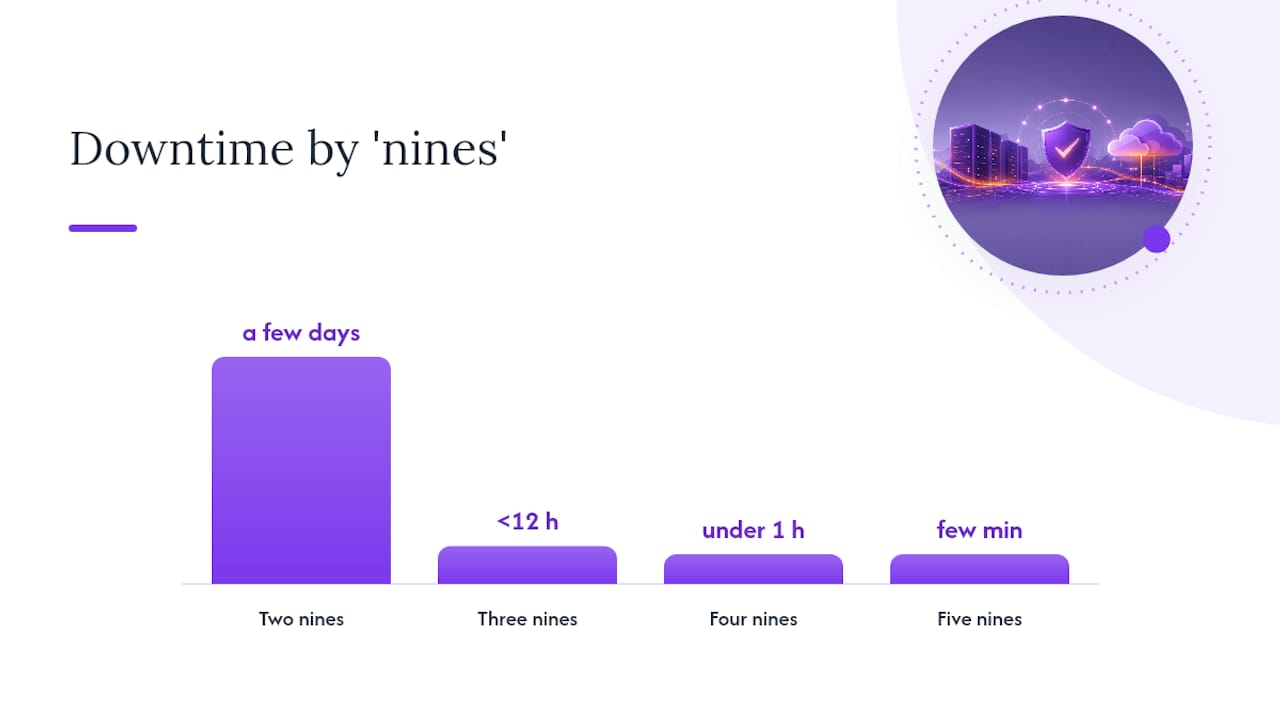
Passer de trois neuf à quatre neuf réduit considérablement le temps d'arrêt autorisé. Cet écart semble gérable jusqu'à ce qu'on le chiffre en transactions perdues pour un prestataire de paiement ou en pénalités de SLA pour un fournisseur de services managés.
SLA, RTO et RPO
Un SLA (accord de niveau de service) est l'engagement contractuel définissant le pourcentage de disponibilité minimal acceptable, souvent assorti de pénalités financières en cas de manquement.
Le RTO (objectif de temps de reprise) est le délai maximal acceptable pour restaurer un système après une défaillance. Le RPO (objectif de point de reprise) est la perte de données maximale acceptable mesurée en temps, c'est-à-dire jusqu'à quel point en arrière vous pouvez vous permettre de revenir.
Leur RTO est de 4 heures par incident et leur RPO est de 1 heure. Cela signifie que chaque défaillance doit être résolue en 4 heures maximum, et qu'une perte de données ne peut pas dépasser 1 heure. Si trois incidents surviennent par an, chacun consommant l'intégralité des 4 heures de RTO, le budget annuel d'indisponibilité est épuisé en trois événements.
RTO et RPO ne sont pas identiques au pourcentage de disponibilité. Ils décrivent la rapidité de la reprise et le volume de données perdu, tandis que le pourcentage de disponibilité décrit la fréquence à laquelle le système est opérationnel. Ces trois indicateurs doivent figurer dans toute discussion sérieuse sur la disponibilité.
Comment les organisations maintiennent-elles la disponibilité de leurs systèmes ?
La disponibilité ne s'obtient pas par hasard. Elle nécessite des choix d'architecture délibérés, superposés à plusieurs niveaux : infrastructure, conception et exploitation.
Contrôles techniques fondamentaux :
- Redondance : dupliquer les composants (serveurs, alimentations, chemins réseau) afin qu'une défaillance unique ne mette pas le système hors service
- Répartition de charge : distribuer le trafic entre plusieurs instances pour qu'aucun nœud ne devienne un goulot d'étranglement
- Mise à l'échelle automatique : augmenter automatiquement la capacité lors des pics de demande, évitant ainsi l'épuisement des ressources
- Basculement : rediriger automatiquement le trafic vers une instance saine en cas de défaillance de l'instance principale
- Réplication géographique : copier les données et les services dans plusieurs régions ou centres de données
- Surveillance et contrôles de santé : sonder en permanence les services et alerter sur les anomalies avant que les utilisateurs ne les remarquent
- Sauvegardes testées : une sauvegarde qui n'a jamais été restaurée n'est pas une sauvegarde ; c'est un espoir
Les patterns d'architecture traduisent ces contrôles en conceptions de systèmes. Une configuration actif-actif fait tourner deux instances identiques ou plus simultanément, partageant la charge et assurant un basculement instantané. Une configuration actif-passif maintient une instance de secours prête à prendre le relais en cas de défaillance de l'instance principale, avec un court délai de commutation. La dégradation gracieuse permet à un système de désactiver les fonctionnalités non critiques sous pression plutôt que de s'effondrer complètement, maintenant ainsi les fonctions essentielles opérationnelles.
Conseil pratique : Avant d'investir dans la réplication géographique, cartographiez votre graphe de dépendances. Une couche web hautement disponible adossée à une base de données dans une seule région constitue toujours un point de défaillance unique. Une réplication au mauvais niveau gaspille le budget sans améliorer la disponibilité réelle.
En quoi la disponibilité diffère-t-elle du plan de reprise d'activité ?
Ces trois concepts sont liés mais résolvent des problèmes différents, et les confondre conduit à une mauvaise allocation des budgets.
| Concept | Objectif | Déclencheur | Outils typiques |
|---|---|---|---|
| Haute disponibilité | Prévenir les temps d'arrêt lors des opérations normales | Pannes courantes, pics de trafic | Redondance, basculement, mise à l'échelle automatique |
| Plan de reprise d'activité (PRA) | Restaurer les opérations après un événement majeur | Défaillance catastrophique, perte d'un centre de données | Sauvegardes, site de reprise, runbooks |
| Continuité d'activité | Maintenir les fonctions métier critiques opérationnelles | Toute perturbation majeure | PRA + solutions de contournement manuelles + plans de communication |
Le pilier Fiabilité du cadre AWS Well-Architected trace cette ligne clairement : l'ingénierie de disponibilité gère les perturbations quotidiennes ; le plan de reprise d'activité gère les catastrophes. Ces deux domaines requièrent des investissements et des cadences de test différents.
Utilisez les contrôles de haute disponibilité lorsque :
- Les défaillances sont fréquentes, prévisibles ou de faible ampleur (une panne de serveur isolée, une interruption réseau brève)
- La reprise doit être automatique et quasi instantanée
- Le coût de l'indisponibilité par heure dépasse le coût d'une infrastructure redondante
Passez à une planification complète du PRA lorsque :
- Une région entière, un centre de données ou un système entier pourrait être perdu simultanément
- La reprise nécessite une intervention humaine et une coordination entre plusieurs équipes
- Les exigences réglementaires imposent des procédures de reprise testées avec des RTO/RPO documentés
Une note pratique : les fenêtres de maintenance planifiée sont souvent exclues des calculs de disponibilité dans les SLA. Vérifiez toujours ce que couvre la fenêtre de mesure et quelles exclusions s'appliquent avant d'accepter une promesse de disponibilité à sa valeur nominale.
Quelles sont les menaces les plus fréquentes contre la disponibilité ?
La perte de disponibilité provient de deux grandes catégories : les attaques délibérées et les défaillances accidentelles. Les deux peuvent être catastrophiques ; elles nécessitent simplement des mesures d'atténuation différentes.
Menaces délibérées :
- Attaques par déni de service distribué (DDoS) : inondent un service de trafic jusqu'à ce qu'il ne puisse plus répondre aux requêtes légitimes
- Rançongiciels : chiffrent les données ou les systèmes, les rendant inaccessibles jusqu'au paiement d'une rançon ou à la restauration des sauvegardes
- Verrouillages par compromission d'identifiants : les attaquants déclenchent les politiques de verrouillage de compte pour refuser l'accès aux utilisateurs légitimes
Causes accidentelles :
- Défaillance matérielle : un disque, une alimentation ou une carte réseau tombe en panne sans avertissement
- Bogues logiciels : un déploiement défaillant introduit une boucle de plantage ou une fuite mémoire
- Épuisement des capacités : le trafic augmente plus vite que l'infrastructure ne s'adapte, provoquant des délais d'attente et des erreurs
- Certificats expirés : un certificat TLS périme et les navigateurs bloquent l'accès au service
- Erreur humaine lors d'une maintenance : une règle de pare-feu mal configurée, une table de base de données supprimée par erreur ou un échec de retour arrière lors d'un déploiement
- Points de défaillance uniques : tout composant sans homologue redondant qui, en cas de panne, entraîne la chute de l'ensemble du système
La distinction essentielle entre attaques et accidents réside dans l'intention, mais l'impact opérationnel est souvent identique. Une attaque par rançongiciel et une migration de base de données ratée peuvent toutes deux provoquer des heures d'indisponibilité. La différence apparaît dans la réponse : une attaque nécessite une réponse à incident et une analyse forensique ; un accident requiert un retour arrière et un post-mortem.
Comment définir des objectifs de disponibilité à partir de l'impact métier ?
Chercher à atteindre cinq neuf parce qu'un concurrent les revendique est une erreur courante et coûteuse. Les recommandations du cadre AWS Well-Architected sont directes : déduire les objectifs de disponibilité de l'impact métier, et non de pourcentages de disponibilité affichés à des fins commerciales.
Une méthode reproductible :
- Identifier vos processus métier critiques. Quels processus, s'ils sont interrompus, stoppent directement les revenus, nuisent aux clients ou déclenchent des pénalités réglementaires ?
- Estimer le coût de l'indisponibilité par heure. Inclure les pertes de revenus, les coûts de support, les pénalités de SLA et l'impact sur la réputation.
- Associer ce coût à un RTO et un RPO. Si une heure d'indisponibilité coûte 50 000 €, votre RTO doit être bien inférieur à une heure. Si la perte de 24 heures de données de transactions est catastrophique, votre RPO doit être mesuré en minutes.
- Sélectionner le pattern d'infrastructure répondant à ces objectifs. Adapter l'architecture à l'exigence, et non l'inverse.
- Chiffrer l'écart. Une architecture actif-actif multirégion coûte significativement plus cher qu'une architecture actif-passif monorégion. Si le coût de l'architecture dépasse le coût de l'indisponibilité qu'elle prévient, remettez en question l'objectif.
Trois exemples illustrant cette démarche en pratique :
- Application d'administration interne : l'indisponibilité est gênante mais sans impact sur les revenus. Un RTO de 4 heures et une configuration actif-passif simple avec des sauvegardes quotidiennes est proportionné.
- Site e-commerce public : chaque heure d'indisponibilité entraîne une perte de revenus réelle. Un RTO de 15 minutes, un RPO de 5 minutes et une architecture actif-actif avec réplication en temps réel sont justifiés.
- Service financier réglementé : l'indisponibilité déclenche des obligations de déclaration réglementaire et des amendes potentielles. Un RTO mesuré en secondes, un RPO proche de zéro et une redondance géographique avec basculement testé constituent le minimum requis.
Conseil pratique : Intégrez la maintenance planifiée dans vos calculs de SLA dès le départ. Négociez explicitement les exclusions de maintenance ou mettez en place des pipelines de déploiement sans interruption de service.
Une liste de contrôle pratique pour votre équipe
Les contrôles appropriés dépendent de votre taille et de votre profil de risque. Commencez là où vous en êtes.
Petite équipe ou startup :
- Identifier les trois services sans lesquels votre activité ne peut pas fonctionner.
- Confirmer que chacun dispose d'une sauvegarde testée et d'une procédure de restauration documentée.
- Mettre en place une supervision de disponibilité (même un outil en version gratuite) avec des alertes vers un téléphone ou un canal Slack.
- Rédiger un runbook d'une page pour chaque service critique : que faire en cas de panne, qui appeler et où se trouvent les sauvegardes.
- Consulter le SLA de votre hébergeur et noter les exclusions prévues.
Organisation de taille intermédiaire :
- Réaliser un inventaire des dépendances : cartographier les dépendances entre services et identifier les points de défaillance uniques.
- Définir le RTO et le RPO pour chaque système critique et vérifier que l'architecture actuelle peut les respecter.
- Tester la restauration des sauvegardes chaque trimestre, pas seulement leur création.
- Mettre en œuvre des contrôles de santé et des alertes automatisées avec des chemins d'escalade.
- Revoir les SLA fournisseurs annuellement et les aligner sur vos objectifs internes de RTO/RPO.
Grande entreprise :
- Organiser des exercices sur table simulant des défaillances de disponibilité, y compris des scénarios de rançongiciel.
- Maintenir une analyse d'impact sur l'activité (BIA) formelle qui associe les processus à leur impact financier et alimente directement les objectifs de RTO/RPO.
- Séparer l'ingénierie de haute disponibilité de la planification du plan de reprise d'activité, avec des responsables, des budgets et des calendriers de test distincts.
- Auditer les exclusions de SLA chez tous les fournisseurs critiques et consolider le reporting dans un tableau de bord de disponibilité unique.
- Aligner les contrôles de disponibilité sur le périmètre de votre certification ISO 27001 et sur votre Déclaration d'Applicabilité.
La meilleure action rapide, quelle que soit la taille de l'équipe : testez vos sauvegardes aujourd'hui. Pas le trimestre prochain. Aujourd'hui. Une sauvegarde qui n'a jamais été restaurée est une hypothèse non vérifiée, et ce sont les hypothèses non vérifiées qui font échouer les plans de disponibilité.
Pourquoi la planification de la disponibilité concerne désormais tout le monde, pas seulement l'équipe Ops
L'ancien modèle mental confiait la disponibilité exclusivement à l'équipe infrastructure. L'Ops maintenait les systèmes en marche ; la sécurité repoussait les acteurs malveillants ; le métier fixait les SLA en espérant le meilleur. Cette séparation ne tient plus, et la raison en est le rançongiciel.

Lorsqu'un attaquant chiffre vos systèmes et exige une rançon, il ne vole pas de données au sens traditionnel. Il attaque la disponibilité. La triade CIA l'exprime clairement : la confidentialité, l'intégrité et la disponibilité sont des propriétés de sécurité de poids égal. Pourtant, la plupart des organisations traitent encore la disponibilité comme une métrique de fiabilité et la confidentialité comme la métrique de sécurité. Cette séparation laisse un angle mort que les attaquants exploitent délibérément.
Les recommandations du NIST sur la cybersécurité dans le contexte de l'Industrie 4.0 formulent clairement ce point d'intégration : la planification moderne de la résilience doit réunir la sécurité, les opérations informatiques et la continuité d'activité, car les menaces ne respectent pas les frontières organisationnelles. Un incident de rançongiciel est simultanément un événement de sécurité, une défaillance de disponibilité et une crise de continuité d'activité. Y répondre exige que ces trois disciplines travaillent à partir du même plan d'action.
Ce qui est constamment sous-estimé, c'est à quel point l'analyse d'impact sur l'activité conditionne tout le reste. Les équipes passent des semaines à débattre de la construction d'une architecture actif-actif ou actif-passif, alors que la vraie question est : que coûte réellement une heure d'indisponibilité à cette organisation ? Répondez honnêtement à cette question et la décision d'architecture se prend généralement d'elle-même. La comparaison ISO 27001 vs. NIST mérite d'être lue si vous cherchez à déterminer quel cadre ancrer vos contrôles de disponibilité, car les deux traitent la disponibilité différemment en termes de périmètre et d'exigences d'audit.
La prochaine étape concrète est simple : choisissez un processus métier critique, estimez ce que coûte une heure d'indisponibilité et associez ce coût à un RTO. Cet exercice unique vous en apprendra plus sur vos véritables exigences de disponibilité que n'importe quelle page marketing de disponibilité d'un fournisseur.
Si votre organisation intègre les exigences de disponibilité dans une mise en œuvre ISO 27001, l'évaluation de maturité ISO 27001 d'Ismscalculator traduit vos contrôles de sécurité, y compris la disponibilité, en une estimation personnalisée des coûts et des efforts. Vous pouvez également effectuer un audit rapide gratuit en 2 minutes pour connaître votre niveau de maturité actuel sur l'ensemble des quatre thèmes de contrôle d'ISO/IEC 27001:2022 avant de vous engager dans un plan de mise en œuvre complet.
Sources
- Dictionary
- Définition et signification d'AVAILABILITY - Merriam-Webster
- Détecter et répondre (projet NCCoE)
Recommandé
- Le rôle de l'inventaire des actifs dans l'efficacité d'un SMSI | ISMS Calculator
- Meilleures alternatives à CanadianCyber.ca pour ISO 27001 en 2026 | ISMS Calculator
- ISO 27001 vs SOC 2 : lequel vous faut-il ? | ISMS Calculator
- Comment évaluer la maturité de votre SMSI avant un audit | ISMS Calculator